The line a text game shows while it waits for your typed command, often displaying status such as health, magic, or your location.
What is a command prompt in text-based games?
Command prompt is the line a text game shows while it waits for you to type a command. It often displays live status such as your health, magic, or location.
A command prompt is the symbol or line a text game prints to show it is ready for your input. In simple games it can be a single “>” character. In many multiplayer text games it is a short status line packed with numbers such as your health points, magic, and movement.
The prompt does two jobs at once. It signals that the game is waiting for you to type something, and it can show live information you would otherwise have to request with a separate command. Whatever you type at the prompt is read by the game’s parser, which figures out what you meant and carries out the action.
Many games and clients let you customize the prompt, choosing which stats appear and in what order. The prompt usually updates on its own after each action, so you do not need to retype anything to see the newest numbers.
Jump to section
Command Prompt: a brief history
The command prompt comes from the command-line interfaces of early computers, where a prompt character told you the system was ready for a typed instruction. The text adventures of the mid-1970s, such as Colossal Cave Adventure and later Zork, carried this idea into games by showing a plain prompt and waiting for the player’s next command.
As multiplayer text games (MUDs, or multi-user dungeons) grew through the late 1970s and 1980s, developers generally extended the prompt to display live status like health and magic. This let players track their condition during fast combat without stopping to type a separate score command. DikuMUD, written in 1990 and 1991 by a team at DIKU, the computer science department of the University of Copenhagen, spread this style widely: its many descendant codebases commonly shipped configurable status prompts showing hit points, mana, and movement points, and the idea of a customizable prompt has stayed standard ever since.
An example command prompt from Erion MUD, showing HP, mana, and experience needed to get to the next level.
How it's used today
You will see a command prompt in almost any game that takes typed commands, from single-player interactive fiction to large online worlds. In text roleplay and adventure games it is where every turn begins: you read the room, read your prompt, then type what you want to do.
Modern MUD clients often let you restyle the prompt, add color, or feed its numbers into gauges and health bars. Even so, the underlying text prompt is still the point where your commands go in.
The prompt matters for accessibility and automation too. Because it is plain text, it works well with a screen reader, and players who use one often trim their prompt down to a few key numbers so their status is quick to hear after every action. Players who use scripting also lean on the prompt, since a line that repeats in a predictable format is an easy place to aim triggers that track stats or warn about low health.
Types of games where the term is commonly used include:
MUD, MUSHES, IF, RPI, RP MU, Social, MMORPG.
Command Prompt examples
A DikuMUD-style prompt reads <100hp 55mp 120mv> before each command, so you can watch your health and magic drop during a fight.
In interactive fiction the prompt is often just a > blinking on its own line, waiting for you to type something like open door.
A player customizes their prompt to include the room name: [The Old Bridge] <80hp 40mp>.
A new player asks in chat, “What do the numbers in my command prompt mean?” and a veteran explains that they are hit points, mana, and moves.
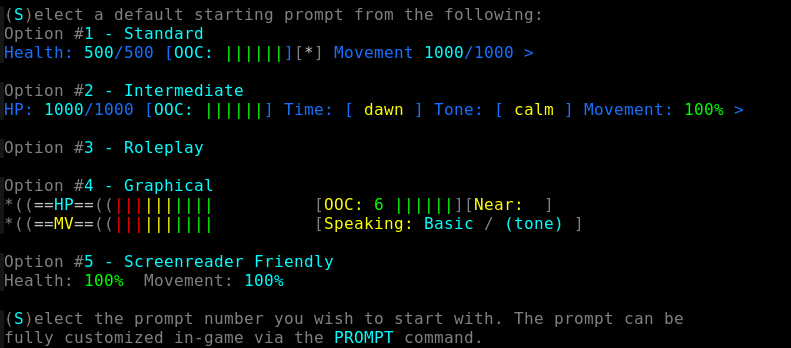
Available default prompts in Legends of the Jedi, a Star Wars roleplaying game.
Myths and misconceptions
A command prompt is always just a “>” symbol. That is true in a lot of interactive fiction, but many multiplayer games pack live status into the prompt, so it can be a whole line of numbers for health, magic, and more.
A game’s command prompt is the same thing as your computer’s Command Prompt. They share a name and the same basic idea, but a game prompt only takes in-game commands and does not run anything on your actual computer.
You have to type a command to refresh the numbers in your prompt. The prompt normally updates on its own after each action, so the stats you see are already current without any extra typing.
Command Prompt FAQs
What is a command prompt in a text-based game?
A command prompt is the symbol or line the game shows to tell you it is ready for your input. It can be a simple “>” or a status line displaying numbers like your health, magic, and movement.
What do the numbers in a command prompt mean?
They are usually live stats for your character, most often hit points (health), magic or mana points, and movement points. The exact labels and order depend on the game, and many games explain them in a help file.
Can I change or customize my command prompt?
In many games, yes. Servers often have a prompt setting that lets you pick which stats show and in what format, and some clients can restyle the prompt further with color or turn its numbers into on-screen gauges.
Why isn’t my command prompt showing up?
It may be scrolled off the screen, hidden by a client setting, or the connection may have dropped. If the game has stopped responding entirely, you may have gone linkdead, meaning your link to the server was lost.
Is a game’s command prompt the same as the Windows Command Prompt?
No. The Windows Command Prompt is a program for running system commands on your computer. A game’s command prompt is just the in-game line where you type actions, and it only controls your character in that game.




Leave a Comment